
Connectivity can vary.
Basements, cores and steel decks block the signal. Crews still need the model in front of them.
OcuBuild connects BIM, field data and real-world construction environments through spatial infrastructure intelligence and immersive operational visualization.
Multiple drawings, multiple versions and multiple interpretations create the gap between what was coordinated on screen and what gets installed in the field.
OcuBuild extends the construction systems teams already use, creating a runtime coordination layer between digital plans, spatial context and the field.
This is what lives above the ceiling and behind the walls, at full scale and in place. Keep scrolling to move through it the way a crew will.
Move between chilled water headers and condenser lines the way the crew will see them, and spot conflicts while they’re still digital. Turn systems on or off to focus on one scope.
Cable ladders sit in the same model as the piping below them, so crews can review tray routes, drops and clearances before the first rung goes up.
Pumps, valves and risers appear at their modeled elevations, so teams can review housekeeping pads, access and isolation points before equipment arrives.
Open a marker to read its field note: location, check, sign-off and time, captured offline and synced later.
Everything you just explored can be brought onto the real structure. OcuBuild aligns the coordinated model to the space in front of the crew, so the conversation happens on site instead of over a drawing set.
This walkthrough illustrates OcuBuild’s vision for spatial field execution through the OcuCore Runtime Engine.
Bring BIM and CAD context into real-world environments so teams understand what belongs where.
Isolate MEPF, low-voltage, AV and data systems so teams focus on what matters.
Drop context, questions and issue markers directly where field execution decisions happen.
Compare digital plans to real-world installs before mistakes happen.
Every field decision is recorded with who, where and when, so answers are ready at closeout.
Standards, permissions and visibility across projects for general contractors and owners.
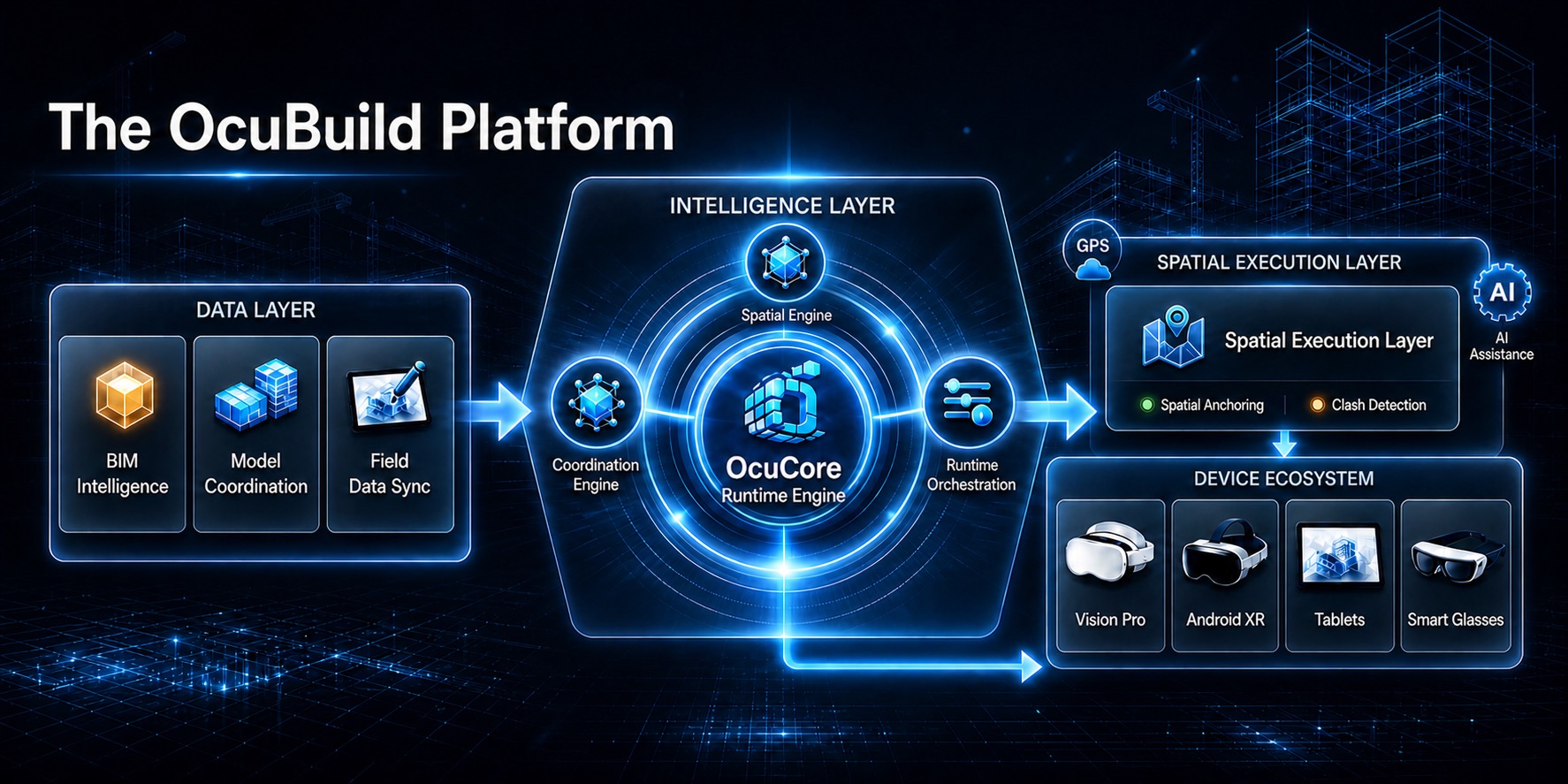
Coordinate model context, spatial logic and field-facing execution through a central runtime layer.
Focus views by trade scope: electrical, data/AV, HVAC, life safety or combined systems.
Capture installation context where the issue exists, not buried inside disconnected comments.
Support field review when connectivity is unreliable inside active jobsite environments.
Connectivity varies and field conditions change, but work continues. That’s why OcuCore keeps working when the signal doesn’t.
Basements, cores and steel decks block the signal. Crews still need the model in front of them.
What’s installed today can differ from yesterday’s drawing. The field view has to keep up.
Syncs automatically when the signal returns
Illustrative interface.
OcuBuild connects BIM intent, field context and installation verification through a spatial execution workflow.
 Unifying Construction Reality
Coordinated information still needs field context. Crews need to know what was intended, what’s actually there, and what applies right here.
We share a short overview of the company, the market and our roadmap with qualified investors.
Two minutes: your role, project type and team size.
We walk through OcuBuild using a coordination-heavy project like yours.
Start with one scope or one level, and measure the results with your own crews.
OcuBuild is preparing pilot and capability conversations with teams working in dense, coordination-heavy construction environments.
If your inquiry needs more detail, use the questionnaire that best matches the conversation.
Use this if you’re exploring OcuBuild for construction workflows, coordination-heavy projects, XR field execution, BIM visualization or pilot access.
Start Pilot QuestionnaireThis questionnaire is designed for project managers, VDC teams, developers, supers, coordinators and field leadership helping shape real-world construction execution workflows.
Open Feedback Questionnaire